


Freeze-dried fruit snacks to Amazon Subscribe & Save workflow
Editorial Team
Instead of manually reordering fruit snacks whenever the lunchbox basket runs low, use Amazon Subscribe & Save for an eligible listing and match the delivery schedule to what your family actually eats. This guide shows you how to check the product, set up recurring deliveries, and adjust around school breaks without letting unopened bags pile up.
TL;DR
- For amazon subscribe and save fruit snacks, check the exact listing before setting up recurring deliveries.
- Naturesturn freeze-dried fruit snacks suit parents seeking 100% fruit options with no added sugar.
- Count individual snack bags, not shipping boxes, when planning lunchbox restocks.
- Review Amazon Subscribe & Save before school breaks and whenever your family’s snack routine changes.
Why this matters
A recurring delivery repeats your purchase. It does not know that school closed for a week, your child stopped enjoying pear, or another caregiver already filled the pantry.
Naturesturn freeze-dried fruit snacks are best for parents seeking 100% fruit options with no added sugar. The Naturesturn store catalog helps you compare fruit choices, but an Amazon subscription must be set up and managed on Amazon for the exact listing you choose.
Keep those two tasks separate: choose the snack first, then choose the ordering method. A product sold through a brand’s own store does not establish that the same pack has an Amazon subscription option.
For your 2026 school routine, make the goal simple: enough familiar fruit snacks for planned packing days, with a quick check before each recurring order.
Before you start
- Have your Amazon account and delivery details ready. You need access to the account that will own the subscription, along with the intended address and payment method.
- Gather the product label and school guidance. Check ingredients, allergen statements, individual bag size, and the school’s snack rules. No added sugar does not mean sugar-free; fruit contains naturally occurring sugar.
- Check the exact listing before planning around it. Subscribe & Save applies to eligible Amazon listings, not automatically to every flavor or pack sold by a brand. Confirm the selected flavor, pack count, seller information, and purchase option before continuing.
Do not subscribe to an unfamiliar snack just to automate shopping. Try the flavor and texture at home first, especially when a child has strong preferences or needs an age-appropriate food texture.
Product choice and pantry count
Choose the packing format
- Decide whether you want unopened individual bags for school or a larger bag to portion at home. Follow the school’s requirements for original packaging and ingredient information.
- Read the full product title and package details. Distinguish the number of bags from the weight of each bag; neither tells you the other.
- Choose a flavor your child already enjoys. Save new flavors for a relaxed taste test rather than the first day of a recurring order.
- Check the current label for ingredients and allergen information. A short ingredient list does not replace that check.
Expected result: You can describe the exact snack you want by flavor, individual bag size, and number of bags—not just by the picture on the listing.
These two Naturesturn options illustrate different packing needs. The store products below are references for choosing a format, not confirmation of an Amazon subscription option.
| Product | Best for | Practical advantage | Trade-off |
|---|---|---|---|
| Freeze-Dried Fruit Crisps Lunchbox Snack Variety Pack | Parents packing familiar orchard and berry flavors | Strawberry, apple, and pear in small, single-serve bags sized for school lunches | The mix does not let you select only one favorite fruit |
| Freeze-Dried Fruit Crisps Sampler Variety Pack | Families choosing flavors before repeating an order | One bag of each of eight flavors supports an at-home taste test | A child who likes only a few flavors can leave part of the assortment uneaten |
Choose the Lunchbox Snack Variety Pack for established preferences; choose the Sampler Variety Pack for discovery. Neither format removes the need to check school policies or your child’s needs.
Compare packing formats

Strawberry, apple, and pear in small, single-serve bags sized for school lunches. No sugar added.
$24.99

One bag of each of eight flavors to help your family find favorites.
$21.99
Count the bags you actually use
- Write down the number of children receiving this snack and the school days you intend to pack it. Do not assume fruit crisps will go into every lunch.
- Count the unopened bags already in your pantry. Separate bags reserved for outings, classroom contributions, or another household member.
- Calculate your planned use over a specific period. For example, 2 children × 5 school days × 1 bag equals 10 bags per week. This is a planning example, not a serving recommendation.
- Compare that use with the exact pack count on the Amazon listing. In the example, 4 school weeks would use 40 bags before subtracting pantry supplies.
Expected result: You have a bag count to guide the order quantity rather than choosing a delivery interval by habit.
For your 2026 packing plan, count actual school days. A calendar month and four school weeks are different planning units, particularly around holidays.
Amazon subscription setup
Confirm the recurring order
- Sign in to Amazon and open the exact product listing you intend to order. Recheck the flavor and pack selection after making any variation changes.
- Select Subscribe & Save when that purchase option is shown. If it is not shown for the selected listing, do not treat a regular purchase as a recurring order.
- Choose the order quantity and a delivery frequency offered on that listing. Use your pantry calculation rather than assuming the default selection fits your household.
- Review the first delivery information, address, payment method, and recurring-order details before confirming. Read the terms presented on your screen.
- Complete the subscription setup, then open Amazon’s subscription-management area to verify the product and next scheduled delivery.
Expected result: The recurring order appears in your Amazon account with the intended product, quantity, address, and delivery schedule.
Amazon’s mobile app and website can arrange controls differently. Use the purchase option and subscription details displayed in your account; do not substitute a similarly named product because its page looks closer to a guide.
The Amazon order details—not a separate shopping note—are the final check on what you have scheduled. Keep your 2026 pantry plan as a reminder, not as proof that the account settings are correct.
Build a delivery-review habit
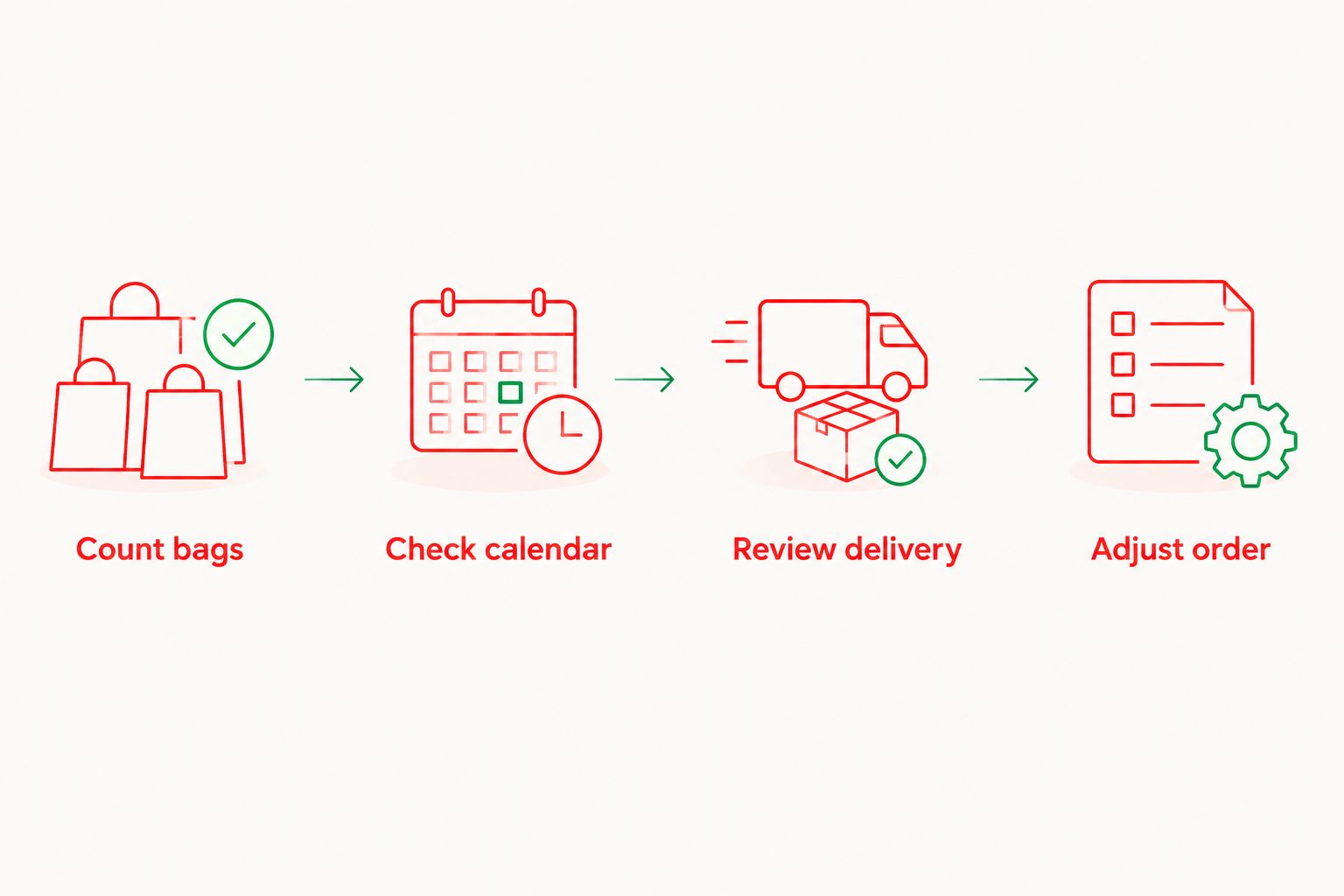
- Count bags. Check unopened individual bags before the next recurring order.
- Check calendar. Look for school breaks, travel, sports days, and changes in who needs a packed snack.
- Review delivery. Compare your remaining supply with the next delivery shown in Amazon.
- Adjust order. Use the subscription controls to change the next order or delivery schedule when needed, then verify the saved result.
Expected result: Your next order reflects the current household routine instead of repeating an outdated plan.
Give one adult responsibility for the account changes, even if several people pack lunches. A shared note can record pantry counts, but the person managing the subscription should confirm every adjustment inside Amazon.
Adjust the workflow when the school calendar changes
A second useful workflow starts with a calendar change rather than an empty snack basket. Review recurring deliveries as soon as you plan a school break, not after the snacks arrive.
For a 2026 break, count only the days when you expect to use individually packed snacks. A family staying home can have a different packing routine from a family taking daily outings.
- Mark the last packing day before the break and the first packing day after it.
- Count the bags needed through those dates, including any planned travel snacks.
- Open the relevant subscription in Amazon and review the next delivery.
- Use the displayed controls to skip or reschedule an order when the pantry already covers the planned use. Verify the revised next-delivery details afterward.
Expected result: Your recurring order follows the changed calendar without requiring you to rebuild the entire shopping routine.
The advantage of keeping a recurring order is less repeated ordering work. The drawback is that a standing schedule still needs attention when school attendance, appetite, or flavor preferences change.
Troubleshooting
The listing does not show Subscribe & Save
Check that you selected the intended flavor and pack configuration. If the recurring-purchase option is not displayed, use a regular order and a personal reorder reminder instead; a product title alone does not establish subscription eligibility.
Do not set up a subscription for a different snack solely to finish the process. The ingredient and packing checks still come first.
Too many bags remain before the next delivery
Count unopened individual bags, then compare them with the school days ahead. Adjust the next delivery through Amazon’s subscription controls and confirm the revised details.
Look for the cause as well. A disliked flavor, fewer packing days, or a duplicate household purchase calls for a different correction than a simple counting mistake.
The pantry runs low before the next delivery
Recalculate use from your recent packing routine. Include after-school activities only if those snacks actually come from the same supply.
Review the subscription quantity or schedule for future orders. For the immediate gap, choose an appropriate snack already on hand rather than assuming a schedule change solves today’s lunchbox.
The selected pack is not what you expected
Compare the order details with the full listing title, flavor selection, bag count, and individual bag size. Product pictures are not a substitute for those details.
Review future subscription settings before another order repeats the mismatch. Handle the existing order through Amazon’s order-support options according to the information shown in your account.
A child likes only part of the assortment
Sort the remaining flavors and ask which ones your child wants again. Do not count every bag as a usable school snack if some consistently return unopened.
Try unfamiliar flavors at home before changing the recurring order. An assortment offers variety, but repeating unwanted flavors creates pantry clutter rather than packing convenience.
Customize your workflow
Keep the system smaller than the problem it solves. A note with the product, usable bag count, next delivery, and next school break is enough to support a quick review.
For your 2026 lunchbox routine, create a separate spot for unopened school snacks. Store the bags according to their package directions, protect them from crushing, and keep opened fruit crisps away from moisture so they retain their crunch.
Count usable bags, not merely bags owned. Check package condition and date markings during restocking, and use earlier-dated suitable bags first.
Naturesturn fruit crisps offer simple fruit choices, but a recurring shipment cannot check a school’s allergy policy or a child’s changing preferences. Keep those decisions with the parent or caregiver, and treat the fruit snack as one part of the packed meal.
FAQ
How do I set up Amazon Subscribe and Save fruit snacks?
Open the exact Amazon listing, select Subscribe & Save when shown, and choose the offered quantity and delivery frequency. Review the product, address, payment details, and first delivery before confirming, then verify the subscription in your account.
Can I subscribe to any Naturesturn fruit snack on Amazon?
Check the exact Amazon listing rather than assuming every Naturesturn product supports Subscribe & Save. A product in the brand’s own store catalog does not establish an Amazon recurring-purchase option.
How many fruit snack bags should I order for school lunches?
Base the quantity on your planned packing days and the unopened bags already at home. As a planning example, 2 children receiving 1 bag on each of 5 school days would use 10 bags per week; this is not a serving recommendation.
Does no added sugar mean freeze-dried fruit is sugar-free?
No added sugar does not mean sugar-free because fruit contains naturally occurring sugar. Read the current ingredient list and Nutrition Facts label for the exact product and serving size.
Can I skip a fruit snack delivery during a school break?
Use Amazon’s subscription-management controls to review and adjust the next recurring delivery. Confirm the saved schedule and check the next-order details rather than relying only on a calendar reminder.
Are single-serve freeze-dried fruit bags safe for every classroom?
No snack should be assumed safe for every classroom or child. Check the current product label, allergen information, school policy, and the child’s individual needs before packing or sharing it.
Is a variety pack better than one fruit flavor for a subscription?
A variety pack suits families that already enjoy its included flavors; one fruit flavor suits a consistent preference. Test unfamiliar assortments at home before repeating them through a recurring order.
One last thing
The most useful pantry number is not how many bags you bought. It is how many bags your child will actually eat on the days you need to pack them.
Before repeating an order, look at what came home unopened. Let the lunchbox leftovers inform the next delivery.